Eric Gazoni – Wise Old Geek

Technical Advisor | Software Architect | Open Source Creator

Building useful things for 20 years. Still debugging life.

Author: Eric Gazoni

  • openpyxl starts being used

    When I started working on openpyxl a few months ago, I didn’t know it would catch that much activity around it. I’m very happy to see that it can apparently help  so many people 🙂

    I’ll try to follow-up on the bug fixes and new features as far as my time permits, and will usually answer emails within the day. Thank you everyone for using the library, even though it is still far from being perfect 😉 Keep posting bugs on the tracker or ideas and requests on the mailing list !

  • openpyxl is on PyPi

    Yes, I know, yet another post about openpyxl 😉

    This time I’m announcing the release of the 1.1.0 version on PyPi.

    As mentioned in the Wiki, you can now just type easy_install openpyxl to get the latest released version, if you are not much into getting the snapshop from bitbucket.

    Also, thanks to Yaroslav’s great job, openpyxl is also packaged under Debian testing !

    Now there is no valid reason for not giving it a try… maybe except that darn memory footprint…

  • openpyxl turns 1.1

    After two weeks of intense activity around openpyxl, I’m releasing version 1.1 today. This new version brings support for dates and number formats.

    Several bugs have been fixed, thanks to the careful testing of two new contributors, Jonathan Peirce and Yaroslav Halchenko, both working on the PsychoPy project.

    Thanks guys for boosting my morale, providing valuable advises and patches !

    Many thanks goes to Marko Loparic for his support and enthusiasm 😉

    You can get the sources for the latest version here http://bitbucket.org/ericgazoni/openpyxl. I expect a lot of bug reports with this new version, as it is stable but not extensively tested yet, and that the number of possibilities have seriously increased with the introduction of number formatting.

    Keep in mind that the memory footprint is still high, but that it is the target for milestone 1.2. It should perform reasonably well if your needs are moderate (<100.000 cells), but if you want to add more data, then it might start consuming RAM pretty quickly. This holds for writing and reading.

    Memory consumption is almost linear, and a 15MB workbook results in 450MB in RAM.

    There is also a new mailing list for the project: http://groups.google.com/group/openpyxl-users. It’s pretty empty for now, but feel free to ask questions there, I’ll be reading it regularly.

    Bug reports will be better handled if they are filed on the project bug tracker: http://bitbucket.org/ericgazoni/openpyxl/issues/new.

    Happy coding !

  • Why we do what we do

    Yesterday, I went to a Master degree graduation ceremony at the local university. The introduction speech addressed to the soon-former-students was extremely interesting.

    It recalled me why we work.

    If  you listen to the biblical sayings, it’s because mankind is a band of sinners that were  thrown out from Paradise. However, there are still people when given the opportunity not to work at all that still find some occupation instead of just sunbathing on a mexican beach.

    The speaker made a clear distinction between “job” and “work”, between what he called “paid work” and “life work”.

    For many of us, working is a kind of prostitution of ourselves: we trade our time against money. But maybe there’s more than just money ? Maybe there are greater extends, greater causes, greater expectations ?
    For many of us, working is just what we were told to do to “earn” our life, but in the end, is a life spent hunting for our food is a life worth living ?

    For many of us, we could completely miss the point of our own life, because the society says we shouldn’t look for our inner desires, dreams and thoughts, and instead get rich so we can afford everything salesmen try to sell us, like a new(er) mobile phone, a bigger car, a bigger house to put our bigger LED 3D TV.

    Or … maybe there is some art to do in this world. Maybe there is some mystery awaiting for us to solve it ? Maybe we could replace the word “work” by “craft”, that conveys a totally different meaning ?

    Maybe we can use our work as a medium to express ourselves, to add meaning over marketable work.

    As Leonardo da Vinci said:

    As a well-spent day brings happy sleep, so a life well spent brings happy death.

    Had he only done his job (painting, sculpting), even very well, he wouldn’t have achieved such fame as he has now, as museums are filled with less famous artists, but who had of course great skills. What made the difference is that da Vinci was inventing new techniques that made his work astoundingly better that any competitors. He spent his life looking at the World straight in the eyes, and constantly invented new painting techniques, described physical and biological principles, designed music instruments, bridges and weapons, etc…

    He was well paid to do so, but even the most well paid engineer wouldn’t spend his life working in such way if it wasn’t coming from within his own self. I don’t think Leonardo felt he traded his time for money. I believe he would not have stopped if the payment stopped, because it was a personal quest for beauty and knowledge he was on.

    Masterpieces are always made by passionate people, who are not looking for money, but to achieve a higher level of mastery in their “art”, artistic or technological.

    So now, what about transforming our daily job into masterpieces ?

  • openpyxl reaches 1.0 mark

    After a few more efforts, I am pleased to announce the release of the first version of openpyxl.

    The reader and the writer are working and tested for strings and numbers.

    I have been able to read and write simple Excel 2007 xlsx files from Python and open them with Excel.

    You can clone the repository using Mercurial:

    hg clone https://ericgazoni@bitbucket.org/ericgazoni/openpyxl

    or download the release in zip format.

    Edit: 1.0 release is really outdated, you might want to get a more recent version here.

    The (sparse for now) documentation can be found on the wiki.

    Reader usage (using the “empty_book.xlsx” file from the previous example)

    from openpyxl.reader.excel import load_workbook
    
    wb = load_workbook(filename = r'empty_book.xlsx')
    
    sheet_ranges = wb.get_sheet_by_name(name = 'range names')
    
    print sheet_ranges.cell('D18').value # should display D18
    

    Code is published under the MIT licence, so you can use it for whatever use you need, and I’d be very happy if  you drop me an email if  you use it 🙂

    If you don’t find it useful, spot a bug, or want to suggest an enhancement, you can do so by filling a ticket on the tracker.

    Features that will be added in the next version are listed here, so if you need something in this list, please be patient or send me a message to tell me to hurry 😉

  • openpyxl: simple writer done

    I’ve been very busy on openpyxl the last few days, and I managed to get a working writer for basic data types (strings, numerics).

    For the impatient, you can clone my bitbucket repository:

    hg clone https://ericgazoni@bitbucket.org/ericgazoni/openpyxl
    

    It’s still a work in progress, so expect some quirks here and there, and if that happens, please file a new issue here.

    If you like it, you can also drop a comment below or send me an email (see Contact page).

    Usage is pretty simple as you can see:

    from openpyxl.workbook import Workbook
    from openpyxl.writer.excel import ExcelWriter
    
    from openpyxl.cell import get_column_letter
    
    wb = Workbook()
    
    ew = ExcelWriter(workbook = wb)
    
    dest_filename = r'empty_book.xlsx'
    
    ws = wb.worksheets[0]
    
    ws.title = &quot;range names&quot;
    
    for col_idx in xrange(1, 40):
        col = get_column_letter(col_idx)
        for row in xrange(1, 600):
            ws.cell('%s%s'%(col, row)).value = '%s%s' % (col, row)
    
    ws = wb.create_sheet()
    
    ws.title = 'Pi'
    
    ws.cell('F5').value = 3.14
    
    ew.save(filename = dest_filename)


    Next features are:

    1. a working reader (so that I can read back files generated by the writer)
    2. dates support
    3. calculations
    4. formatting
  • Myth of the genius programmer

    This session held at Google I/O last year brings so many important ideas to become a better programmer that is should definitely be shown in CS classes (and in some IT shops :p).

    Thumbs up guys !

    [youtube=http://www.youtube.com/watch?v=0SARbwvhupQ]

  • Flexibility

    IT projects, like tattoos, are commitments. You wouldn’t accept that kind of answer from a tattoo artist, it’s your body, you have the right to change your mind as long as the ink is not under your skin. Why would that be different for software development ? Why would requirements be written into stone once they were signed ?

    One could explain the too common attitude towards change by two main factors:

    • process momentum
    • stability issues

    Process momentum is the consequence of everyone trying to protect their butt from backfires in case of project failure. As long as you can blame someone else for failure, you think you are safe, but in companies, the way to design the scapegoat is by signing contracts, SLAs, and other forms of paperwork. Every time you make a change in the requirement, someone can feel the contract terms have changed, and therefore, his paper walls are not protecting him anymore. Therefore, either you don’t make changes, either you spend a lot of valuable time to sign agreements.

    Stability issues are the quicksand in which developers who don’t practice testing at a sufficient level are thrown when the requirements drift too much from the initial requests. That’s the typical “We will soon release a patch to fix the bugs introduced by previous patch. Sorry for the inconvenience.”. When you designed things like this and they end up looking like this.

    The Agile manifesto states “Customer collaboration over contract negotiation”. Customer don’t change the requirements because they are evil, or helpless, but because they found a new way to improve their work. That’s what we do, helping them get their work done, and if possible, done better than their competitors. Don’t think of change as a mutation, but as an evolution.

    If our quadruped, monkey-smelling ancestors decided that “walking on our rear limbs was not part of the original design”, just imagine where we would be now. Evolution is the way every live being manages to keep up with changes in its environment. Not changing (or changing two years too late), means putting your own kind in danger. If you eat beef and the new breed of beefs grows two more legs, you’d better find a way to continue chasing them, either by becoming smarter, either increasing your muscular mass (or number of legs, but that’s just gross).

    If you eat money, and the competitor grows a new technology to eat more money than you (and possibly start eating your money), you’d better evolve your own tech right now !

    (more…)

  • The right tool for the job

    There are some tools that really make  your life easier when working.
    Some people might say that the only tool you’ll ever need is Emacs, but when working on Windows, there are some small utilities that can increase your productivity. Here is my personal choice.

    Launchy
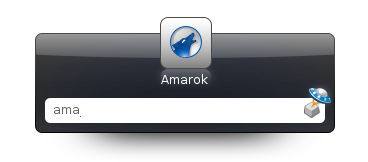

    Launchy is a keystroke launcher. It can index your start menu, your bookmarks, your hard-drive and much more, and then let  you access your applications only by typing the first letters.

    It can also be used as a basic calculator, and directory browser.

    I use it constantly, and my start menu has since become a dumpster, because I never go there anymore.

    Note: for those who are under Windows 7, it works like the über-search from your start menu.

    Launchy is an open source product, you can get it here.

    Synergy

    I have a nice desktop computer with a very nice 22″ screen. I spend most of my (personal) coding time on this computer, but sometimes I wish I had another screen to keep my IDE in full screen while browsing documentation. I can’t afford a new display (and if I added a new 22″ screen next to this one, I couldn’t see my girlfriend anymore because her desk is in front of mine), but I have a 15″ laptop that can fit between the 22″ and the wall.

    For some time I wanted to control the laptop with my old school Compaq keyboard and my 10€ Logitech mouse (don’t need fancy hardware to make good work), but wasn’t satisfied with the idea of a KVM that would need constantly switching inputs from both computers. Then I found Synergy. It’s a virtual KVM. It runs in the background, and can control as many additional computers you can fit on your desk (some guys even tried with 8 or 10, for geekness sake).

    The configuration is very easy (once you understood the documentation):

    Let’s say you have to computers, A and B, A on the left and B on the right. On A, you just tell the program that when your mouse cursor reaches the right edge of your screen, it switches to computer B.
    On computer B, you say that when the mouse goes to the left edge, it switches to computer A. And that’s it.

    You end up seamlessly using both computers as if the display was one, really nice. You can even make cut-and-paste from one computer to another, and even across different OSes because Synergy is multi platform. You can control with one keyboard and one mouse at the same time a Linux netbook, a MacOS X laptop and a Windows desktop.

    Synergy is an open source product, you can get it here.

    Console
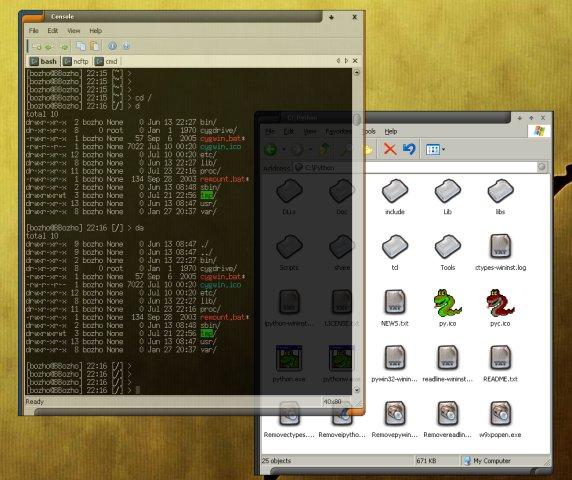
    I’ve already talked about Console here. It’s a Windows command line emulator. It can run any command line application (such as the Windows prompt or Cygwin) inside multiple tabs. It also supports copy-paste, transparency, custom fonts, sizes, colors, …

    Excellent upgrade for your standard cmd.exe.

    Console is an open source product, you can get it here.

    Winsplit Revolution

    Winsplit allows you to organize your windows on your desktop quickly and easily. Windows natively allows you to tile/cascade open windows on the screen, but it will always size them equally.

    What if you want one window take 1/3 of the screen and another one 2/3 ? You have to drag the handles so the window is at the right dimension. Winsplit solves this issue by providing several presets that you can activate by pressing a keystroke (Ctrl+Alt by default) and then drag your window on the region of the screen you wish to place it. A blue overlay will appear, showing you available presets for this region, and you can scroll through presets using the mouse wheel.

    When you are happy with the size and position, just release the window and it will stay there. Very useful when copy-pasting documents side-by-side.

    Winsplit Revolution is a freeware product, you can get it here.

  • openpyxl: my python xlsx library

    Update: openpyxl 1.0 is now out !

    At a customer, we read a lot of Excel files. We’ve tried the conventional approaches, that are xlrd and xlwt, pyinex, and COM automation.

    That’s COM that we mainly use, because it’s able to deal with every Excel file format, from the ancient Excel 5 to most recent Excel 2007 Office Open XML format.
    However, we experience from time to time stability issues (Excel is a complex beast, sometimes you don’t fully understand why it is angry).

    We then looked for a native reader for .xlsx format, to get rid of the Excel part of the equation, but unfortunately, there are only two small read-only libraries for now:

    Finally, I thought that I was the only guy who needed a native .xslx writer, and decided to stick with COM for now.
    I wouldn’t be doing this project now without a tweet from Tarek Ziadé, who was also looking for such a library. That meant that we were at least two in need for the same thing, so I simply decided to write it.

    Trust me, the Office Open XML format is open, but it’s also a bit twisted, so I spent a few days gathering documentation, and I finally landed on the PHPExcel library, that was already doing what I needed, but in PHP.

    So now, I’m busy porting the PHPExcel library under Python, which is really easy, because of the similarities between both languages, but I can also benefit from all the nice things that come with Python, so the code is much simpler.

    You can follow my progress on bitbucket: http://bitbucket.org/ericgazoni/openpyxl/